
In this post we will have a look at a simple linear modal analysis.
This case is taken from a publicy available example on the internet, but the original source is probably this one, for all due credit.
To read this article one will need some knowledge both in Nastran and in Code_Aster.
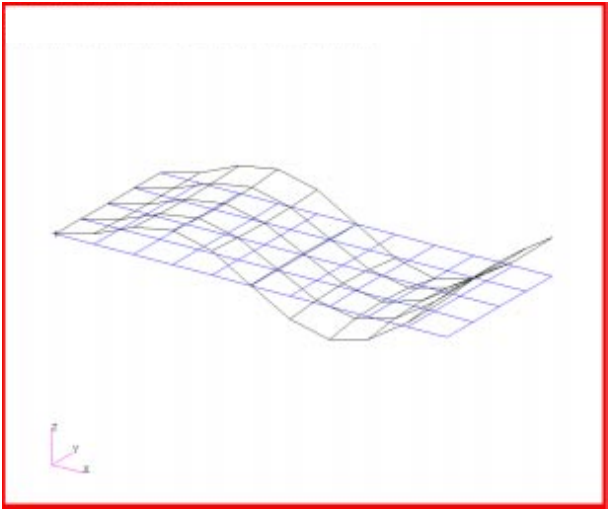
The translation between Nastran and Code_Aster can be made by using the following correspondances :
| Nastran keyword | Code_Aster keyword |
|---|---|
| BEGIN | DEBUT |
| SOL 103 + SUBCASE(METHOD=1) | ASSEMBLAGE + CALC_MODES(SOLVEUR_MODAL =_F(METHODE=’TRI_DIAG’),) |
| TIME 600 | See “prob19.export” file, line “A tpmax 600“ |
| EIGRL | CALC_MODES(OPTION=’PLUS_PETITE’,CALC_FREQ=_F(NMAX_FREQ=5),) |
| PSHELL | AFFE_MODELE(MODELISATION=’DKT‘), AFFE_CARA_ELEM(COQUE_F(EPAIS)) + AFFE_MATERIAU |
| CQUAD4 | See “prob19.mail” file: QUAD4 + AFFE_CARA_ELEM(COQUE=_F(GROUPMA)) |
| MAT1 | DEFI_MATERIAU(ELAS) |
| GRID | See “prob19.mail” file: COOR_3D |
| SPC1 | AFFE_CHAR_MECA(DDL_IMPO) |
| ENDDATA | FIN |
After the calculation we can find the frequencies for the first five modes and compare them with the Nastran results :
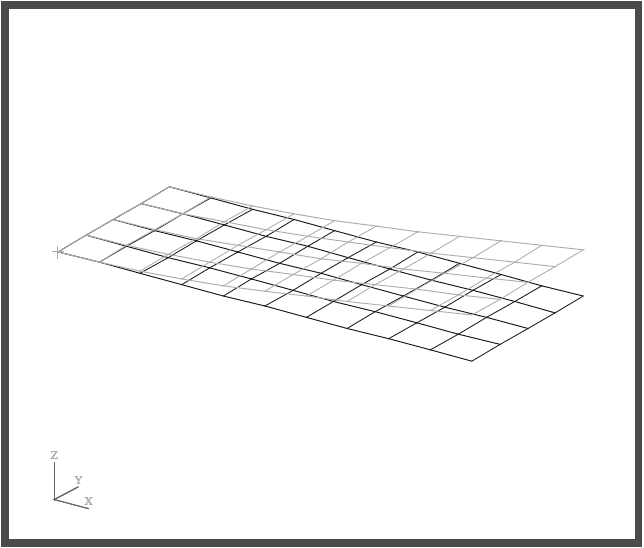
Here is the corresponding mode from Code_Aster results :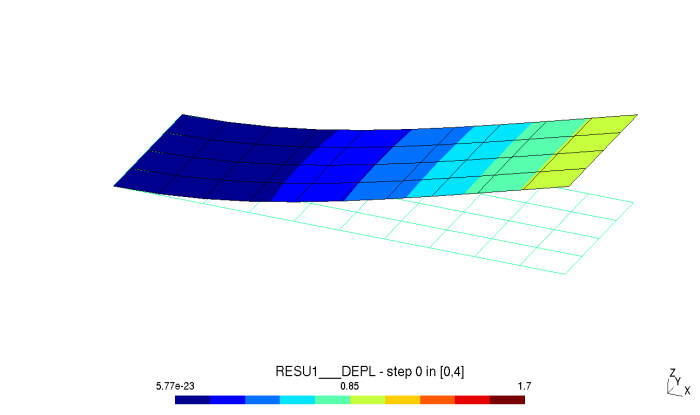
Here is a table of comparison between Nastran and Code_Aster results for this case (Nastran values are taken from the pdf file above) :
| Mode | Nastran Frequency | Code_Aster Frequency | Diff % |
|---|---|---|---|
| 1 | 133.6996 | 133.75689075 | 0.04% |
| 2 | 689.7916 | 698.719757183 | 1.29% |
| 3 | 843.8915 | 837.469216421 | 0.76% |
| 4 | 2212.03 | 2220.53352351 | 0.75% |
| 5 | 2379.052 | 2361.13583993 | 0.75% |
First of all, let’s see the Nastran code (file “prob19.dat”) for this exemple :
ID SEMINAR, PROB19
SOL 103
TIME 600
CEND
TITLE = NORMAL MODES EXAMPLE
ECHO = UNSORTED
SUBCASE 1
 SUBTITLE= USING LANCZOS
 METHOD = 1
 SPC = 1
$VECTOR=ALL
BEGIN BULK
PARAM,COUPMASS,1
PARAM,WTMASS,.00259
EIGRL,1,5,
PSHELL,1,1,.1,1,,1
CQUAD4,1,1,1,2,13,12
=,*1,=,*1,*1,*1,*1
=8
CQUAD4,11,1,12,13,24,23
=,*1,=,*1,*1,*1,*1
=8
CQUAD4,21,1,23,24,35,34
=,*1,=,*1,*1,*1,*1
=8
CQUAD4,31,1,34,35,46,45
=,*1,=,*1,*1,*1,*1
=8
MAT1,1,3.+7,.3,,.282
GRID,1,,0.,0.,0.
=,*1,=,*0.5,=,=
=9
GRID,12,,0.,.5,0.
=,*1,=,*0.5,=,=
=9
GRID,23,,0.,1.,0.
=,*1,=,*0.5,=,=
=9
GRID,34,,0.,1.5,0.
=,*1,=,*0.5,=,=
=9
GRID,45,,0.,2.,0.
=,*1,=,*0.5,=,=
=9
SPC1,1,12345,1,12,23,34,45
ENDDATA
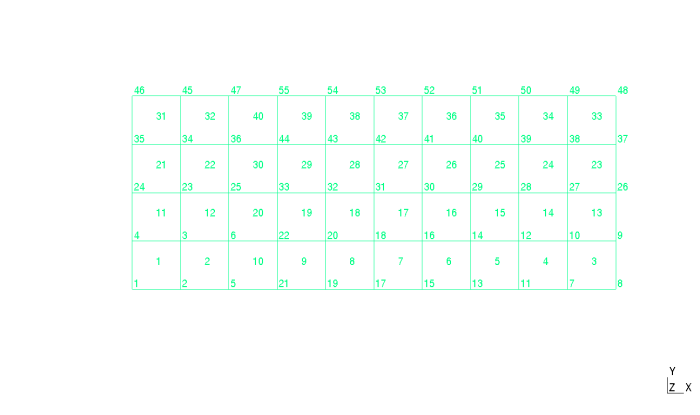
In Code_Aster, you will need to create distinct files for the mesh and the commands. Let’s start with the main mesh file (file “prob19.mail”) :
TITRE
	prob19
	NORMAL MODES EXAMPLE
FINSF

COOR_3D

	N1  0.0000000000e+00 0.0000000000e+00 0.0000000000e+00
	N2  5.0000000000e-01 0.0000000000e+00 0.0000000000e+00
	N13  5.0000000000e-01 5.0000000000e-01 0.0000000000e+00
	N12  0.0000000000e+00 5.0000000000e-01 0.0000000000e+00
	N3  1.0000000000e+00 0.0000000000e+00 0.0000000000e+00
	N14  1.0000000000e+00 5.0000000000e-01 0.0000000000e+00
	N10  4.5000000000e+00 0.0000000000e+00 0.0000000000e+00
	N11  5.0000000000e+00 0.0000000000e+00 0.0000000000e+00
	N22  5.0000000000e+00 5.0000000000e-01 0.0000000000e+00
	N21  4.5000000000e+00 5.0000000000e-01 0.0000000000e+00
	N9  4.0000000000e+00 0.0000000000e+00 0.0000000000e+00
	N20  4.0000000000e+00 5.0000000000e-01 0.0000000000e+00
	N8  3.5000000000e+00 0.0000000000e+00 0.0000000000e+00
	N19  3.5000000000e+00 5.0000000000e-01 0.0000000000e+00
	N7  3.0000000000e+00 0.0000000000e+00 0.0000000000e+00
	N18  3.0000000000e+00 5.0000000000e-01 0.0000000000e+00
	N6  2.5000000000e+00 0.0000000000e+00 0.0000000000e+00
	N17  2.5000000000e+00 5.0000000000e-01 0.0000000000e+00
	N5  2.0000000000e+00 0.0000000000e+00 0.0000000000e+00
	N16  2.0000000000e+00 5.0000000000e-01 0.0000000000e+00
	N4  1.5000000000e+00 0.0000000000e+00 0.0000000000e+00
	N15  1.5000000000e+00 5.0000000000e-01 0.0000000000e+00
	N24  5.0000000000e-01 1.0000000000e+00 0.0000000000e+00
	N23  0.0000000000e+00 1.0000000000e+00 0.0000000000e+00
	N25  1.0000000000e+00 1.0000000000e+00 0.0000000000e+00
	N33  5.0000000000e+00 1.0000000000e+00 0.0000000000e+00
	N32  4.5000000000e+00 1.0000000000e+00 0.0000000000e+00
	N31  4.0000000000e+00 1.0000000000e+00 0.0000000000e+00
	N30  3.5000000000e+00 1.0000000000e+00 0.0000000000e+00
	N29  3.0000000000e+00 1.0000000000e+00 0.0000000000e+00
	N28  2.5000000000e+00 1.0000000000e+00 0.0000000000e+00
	N27  2.0000000000e+00 1.0000000000e+00 0.0000000000e+00
	N26  1.5000000000e+00 1.0000000000e+00 0.0000000000e+00
	N35  5.0000000000e-01 1.5000000000e+00 0.0000000000e+00
	N34  0.0000000000e+00 1.5000000000e+00 0.0000000000e+00
	N36  1.0000000000e+00 1.5000000000e+00 0.0000000000e+00
	N44  5.0000000000e+00 1.5000000000e+00 0.0000000000e+00
	N43  4.5000000000e+00 1.5000000000e+00 0.0000000000e+00
	N42  4.0000000000e+00 1.5000000000e+00 0.0000000000e+00
	N41  3.5000000000e+00 1.5000000000e+00 0.0000000000e+00
	N40  3.0000000000e+00 1.5000000000e+00 0.0000000000e+00
	N39  2.5000000000e+00 1.5000000000e+00 0.0000000000e+00
	N38  2.0000000000e+00 1.5000000000e+00 0.0000000000e+00
	N37  1.5000000000e+00 1.5000000000e+00 0.0000000000e+00
	N46  5.0000000000e-01 2.0000000000e+00 0.0000000000e+00
	N45  0.0000000000e+00 2.0000000000e+00 0.0000000000e+00
	N47  1.0000000000e+00 2.0000000000e+00 0.0000000000e+00
	N55  5.0000000000e+00 2.0000000000e+00 0.0000000000e+00
	N54  4.5000000000e+00 2.0000000000e+00 0.0000000000e+00
	N53  4.0000000000e+00 2.0000000000e+00 0.0000000000e+00
	N52  3.5000000000e+00 2.0000000000e+00 0.0000000000e+00
	N51  3.0000000000e+00 2.0000000000e+00 0.0000000000e+00
	N50  2.5000000000e+00 2.0000000000e+00 0.0000000000e+00
	N49  2.0000000000e+00 2.0000000000e+00 0.0000000000e+00
	N48  1.5000000000e+00 2.0000000000e+00 0.0000000000e+00
FINSF


QUAD4

 E1  N1 N2 N13 N12
 E2  N2 N3 N14 N13
 E10  N10 N11 N22 N21
 E9  N9 N10 N21 N20
 E8  N8 N9 N20 N19
 E7  N7 N8 N19 N18
 E6  N6 N7 N18 N17
 E5  N5 N6 N17 N16
 E4  N4 N5 N16 N15
 E3  N3 N4 N15 N14
 E11  N12 N13 N24 N23
 E12  N13 N14 N25 N24
 E20  N21 N22 N33 N32
 E19  N20 N21 N32 N31
 E18  N19 N20 N31 N30
 E17  N18 N19 N30 N29
 E16  N17 N18 N29 N28
 E15  N16 N17 N28 N27
 E14  N15 N16 N27 N26
 E13  N14 N15 N26 N25
 E21  N23 N24 N35 N34
 E22  N24 N25 N36 N35
 E30  N32 N33 N44 N43
 E29  N31 N32 N43 N42
 E28  N30 N31 N42 N41
 E27  N29 N30 N41 N40
 E26  N28 N29 N40 N39
 E25  N27 N28 N39 N38
 E24  N26 N27 N38 N37
 E23  N25 N26 N37 N36
 E31  N34 N35 N46 N45
 E32  N35 N36 N47 N46
 E40  N43 N44 N55 N54
 E39  N42 N43 N54 N53
 E38  N41 N42 N53 N52
 E37  N40 N41 N52 N51
 E36  N39 N40 N51 N50
 E35  N38 N39 N50 N49
 E34  N37 N38 N49 N48
 E33  N36 N37 N48 N47
FINSF


GROUP_MA NOM = G1
    % Original part : 1
  E1 E10 E11 E12 E13 E14 E15
  E16 E17 E18 E19 E2 E20 E21
  E22 E23 E24 E25 E26 E27 E28
  E29 E3 E30 E31 E32 E33 E34
  E35 E36 E37 E38 E39 E4 E40
  E5 E6 E7 E8 E9
FINSF

FIN
Then, the command file (file “prob19.comm”) :
# prob19
# NORMAL MODES EXAMPLE

DEBUT(PAR_LOT='NON',
      ERREUR=_F(ERREUR_F='ABORT',),
      IGNORE_ALARM=('SUPERVIS_1','MODELISA4_8',),);

MAIL=LIRE_MAILLAGE(FORMAT='ASTER',
                   VERI_MAIL=_F(VERIF='OUI',),);

MODMECA=AFFE_MODELE(MAILLAGE=MAIL,
                    AFFE=_F(GROUP_MA='G1',
                            PHENOMENE='MECANIQUE',
                            MODELISATION='DKT',),);

MAT00001=DEFI_MATERIAU(ELAS=_F(E=30000000.0,
                               NU=0.3,
                               RHO=0.00073038,),);

CHMAT=AFFE_MATERIAU(MAILLAGE=MAIL,
                    AFFE=_F(GROUP_MA='G1',
                            MATER=MAT00001,),);

B1P0=AFFE_CHAR_MECA(MODELE=MODMECA,
                    DDL_IMPO=_F(NOEUD=('N12','N1','N45','N34','N23',),
                                DX=0.0,
                                DY=0.0,
                                DZ=0.0,
                                DRX=0.0,
                                DRY=0.0,),);

CAEL=AFFE_CARA_ELEM(MODELE=MODMECA,
                    COQUE=_F(GROUP_MA='G1',
                             EPAIS=0.1,
                             VECTEUR=(0.9,0.1,0.2,),
                             COQUE_NCOU=1,),);

ASSEMBLAGE(MODELE=MODMECA,
           CHAM_MATER=CHMAT,
           CARA_ELEM=CAEL,
           CHARGE=B1P0,
           NUME_DDL=CO('NUMEDDL1'),
           MATR_ASSE=(_F(MATRICE=CO('RIGI1'),
                         OPTION='RIGI_MECA',),
                      _F(MATRICE=CO('MASS1'),
                         OPTION='MASS_MECA',),),);

RESU1=CALC_MODES(SOLVEUR_MODAL =_F(METHODE='TRI_DIAG'),
                       MATR_RIGI=RIGI1,
                       MATR_MASS=MASS1,
                       OPTION='PLUS_PETITE',
                       CALC_FREQ=_F(NMAX_FREQ=5),
                       SOLVEUR=_F(METHODE='MUMPS',
                                  NPREC=8,),
                       VERI_MODE=_F(STOP_ERREUR='NON',),);

TEST_RESU(RESU=(_F(NUME_ORDRE=1,
                  PARA='FREQ',
                  RESULTAT=RESU1,
                  VALE_CALC=133.6996,
                  TOLE_MACHINE=0.02,
                  ),
               ),);

IMPR_RESU(FORMAT='RESULTAT',
          RESU=_F(RESULTAT=RESU1,
                  NOM_CHAM='DEPL',
                  VALE_MAX='OUI',
                  VALE_MIN='OUI',),);

IMPR_RESU(FORMAT='MED',
          UNITE=80,
          RESU=_F(RESULTAT=RESU1,
                  NOM_CHAM='DEPL',),);

FIN(FORMAT_HDF='OUI',);
You will also need a file to keep everything together ( file “prob19.export”). This file is the one needed to start the calculation on command line (“as_run prob19.export”) :
P actions make_etude
P memory_limit 256.0
P mode interactif
P mpi_nbcpu 1
P mpi_nbnoeud 1
P ncpus 1
P testlist verification sequential
P time_limit 60.0
P version testing
A memjeveux 375.0
A tpmax 172800
P memjob 3072000
P tpsjob 2880
F comm prob19.comm D 1
F mail prob19.mail D 20
F mess prob19.mess R 6
F resu prob19.resu R 8
F rmed prob19.rmed R 80
 Code_Aster for Windows
I created all 3 files into a folder named “prob19”: *.comm *.mail and *.export.
Then I type as_run.bat prob19.export and I get an error. Not sure what is going on. The exact same thing happened with prob6 from the other post.
If I try to run the test codes such as “forma02” it runs fine.
Could you please help me out on this? Are there some settings that I need to enable to run new files that are not on the test section?
Here’s the screen output for reference. Thanks!
C:\code-aster_fem\prob19>echo OFF
——————————————————————————–
Code_Aster execution
prepare environment in C:\Users\ab\AppData\Local\Temp\ju-comp1-interactif.545
——————————————————————————–
Copying datas
copying …\prob19\prob19.comm… copying …\prob19\prob19.mail… Parameters : memory 256 MB – time limit 60 s
——————————————————————————–
Content of C:\Users\ab\AppData\Local\Temp\ju-comp1-interactif.545 before execution
——————————————————————————–
Code_Aster run
Command line 1 :
C:\code_aster_13-3-win64-beta-0-2\install\13.3\bin\aster C:\code_aster_13-3-win64-beta-0-2\install\13.3\lib\aster\Execution\E_SUPERV.py -commandes fort.1 –num_job=545 –mode=interactif –rep_outils=C:\code_aster_13-3-win64-beta-0-2\install\outils –rep_mat=C:\code_aster_13-3-win64-beta-0-2\install\testing\materiau –rep_dex=C:\code_aster_13-3-win64-beta-0-2\install\testing\datg –numthreads=1 –suivi_batch –memjeveux=32.0 –tpmax=60.0
# ——————————————————————————————
# Impression du contenu du fichier de commandes à exécuter :
# ——————————————————————————————
# prob19
# NORMAL MODES EXAMPLE
DEBUT(PAR_LOT=’NON’,
ERREUR=_F(ERREUR_F=’ABORT’,),
IGNORE_ALARM=(‘SUPERVIS_1′,’MODELISA4_8′,),);
MAIL=LIRE_MAILLAGE(FORMAT=’ASTER’,
VERI_MAIL=_F(VERIF=’OUI’,),);
MODMECA=AFFE_MODELE(MAILLAGE=MAIL,
AFFE=_F(GROUP_MA=’G1′,
PHENOMENE=’MECANIQUE’,
MODELISATION=’DKT’,),);
MAT00001=DEFI_MATERIAU(ELAS=_F(E=30000000.0,
NU=0.3,
RHO=0.00073038,),);
CHMAT=AFFE_MATERIAU(MAILLAGE=MAIL,
AFFE=_F(GROUP_MA=’G1′,
MATER=MAT00001,),);
B1P0=AFFE_CHAR_MECA(MODELE=MODMECA,
DDL_IMPO=_F(NOEUD=(‘N12′,’N1′,’N45′,’N34′,’N23′,),
DX=0.0,
DY=0.0,
DZ=0.0,
DRX=0.0,
DRY=0.0,),);
CAEL=AFFE_CARA_ELEM(MODELE=MODMECA,
COQUE=_F(GROUP_MA=’G1’,
EPAIS=0.1,
VECTEUR=(0.9,0.1,0.2,),
COQUE_NCOU=1,),);
ASSEMBLAGE(MODELE=MODMECA,
CHAM_MATER=CHMAT,
CARA_ELEM=CAEL,
CHARGE=B1P0,
NUME_DDL=CO(‘NUMEDDL1’),
MATR_ASSE=(_F(MATRICE=CO(‘RIGI1′),
OPTION=’RIGI_MECA’,),
_F(MATRICE=CO(‘MASS1′),
OPTION=’MASS_MECA’,),),);
RESU1=CALC_MODES(SOLVEUR_MODAL =_F(METHODE=’TRI_DIAG’),
MATR_RIGI=RIGI1,
MATR_MASS=MASS1,
OPTION=’PLUS_PETITE’,
CALC_FREQ=_F(NMAX_FREQ=5),
SOLVEUR=_F(METHODE=’MUMPS’,
NPREC=8,),
VERI_MODE=_F(STOP_ERREUR=’NON’,),);
TEST_RESU(RESU=(_F(NUME_ORDRE=1,
PARA=’FREQ’,
RESULTAT=RESU1,
VALE_CALC=133.6996,
TOLE_MACHINE=0.02,
),
),);
IMPR_RESU(FORMAT=’RESULTAT’,
RESU=_F(RESULTAT=RESU1,
NOM_CHAM=’DEPL’,
VALE_MAX=’OUI’,
VALE_MIN=’OUI’,),);
IMPR_RESU(FORMAT=’MED’,
UNITE=80,
RESU=_F(RESULTAT=RESU1,
NOM_CHAM=’DEPL’,),);
FIN(FORMAT_HDF=’OUI’,);
You will also need a file to keep everything together ( file ?prob19.export?). This file is the one needed to start the calculation on command line (?as_run prob19.export?) :
P actions make_etude
P memory_limit 256.0
P mode interactif
P mpi_nbcpu 1
P mpi_nbnoeud 1
P ncpus 1
P testlist verification sequential
P time_limit 60.0
P version testing
A memjeveux 375.0
A tpmax 172800
P memjob 3072000
P tpsjob 2880
F comm prob19.comm D 1
F mail prob19.mail D 20
F mess prob19.mess R 6
F resu prob19.resu R 8
F rmed prob19.rmed R 81
# ——————————————————————————————
ERREUR DE COMPILATION DANS ACCAS – INTERRUPTION
>> JDC.py : DEBUT RAPPORT
CR phase d’initialisation
!!!!!!!!!!!!!!!!!!!!!!!!!!!!!!!!!!!!!!!!!!!!!!!!!!!!!!!!!!!!!!!!!!!!!!!!!!!!!
! Compilation impossible : File “fort.1”, line 77 !
! You will also need a file to keep everything together ( file !
! ?prob19.export?). This file is the one needed to start the calculation on !
! command line (?as_run prob19.export?) : !
! ^ !
! SyntaxError: invalid syntax !
!!!!!!!!!!!!!!!!!!!!!!!!!!!!!!!!!!!!!!!!!!!!!!!!!!!!!!!!!!!!!!!!!!!!!!!!!!!!!
fin CR phase d’initialisation
>> JDC.py : FIN RAPPORT
Code_Aster run ended, diagnostic : _ABNORMAL_ABORT
——————————————————————————–
Content of C:\Users\ab\AppData\Local\Temp\ju-comp1-interactif.545 after execution
——————————————————————————–
Size of bases
——————————————————————————–
Copying results
copying …\fort.6… copying …\fort.8…
_COPYFILE no such file or directory: fort.81
_ABNORMAL_ABORT Code_Aster run ended
———————————————————————————
cpu system cpu+sys elapsed
———————————————————————————
Preparation of environment 0.00 0.00 0.00 0.00
Copying datas 0.00 0.00 0.00 0.02
Code_Aster run 0.00 0.00 0.00 0.71
Copying results 0.00 0.00 0.00 0.03
———————————————————————————
Total 0.08 0.02 0.09 0.97
———————————————————————————
as_run 1.13.9
————————————————————
— DIAGNOSTIC JOB : _ABNORMAL_ABORT
————————————————————
EXIT_CODE=4
LikeLike
Hi,
I think that there is some text copied by mistake from the blog comments, probably in your prob19.comm file. The text you should look for is : “You will also need a file to keep everything together ( file ?prob19.export?). This file is the one needed to start the calculation on command line (?as_run prob19.export?) :”.
Best regards
LikeLike
Thanks!
It ran fine now. I can see in the .RESU file the modes.
My question is: how do I get a .RMED file that I can visualize? I can see that it is requested in the .EXPORT file, but it does not get created.
Thanks again for all the help!
LikeLike
Hi,
I am glad that you could solve this issue 🙂 If you have modes in .RESU file you should also have the .RMED file. One possibility is that, since it is bigger of other files, when you checked it was still being copied even if the .RESU was already available. Could you please check again now ? You should always wait for the command window to close before looking for result files. Could you please also check for the .MESS file ? It should have a last line like this : EXECUTION_CODE_ASTER_EXIT….=0 to indicate that everything was ok till the end.
Best regards
LikeLike
I’m afraid I’ve had the same problem as described above with the inability to generate .RMED files. I’ve been running the commands through Windows Powershell, and I’m able to generate .mess and .resu files every time. In my .MESS file, the string ‘EXECUTION_CODE_ASTER_EXIT’ does not appear. In the powershell, I see a message saying ‘COPYFILE no such file or directory: fort.81’.
Thank you for any and all advice.
LikeLike
If an error occurs during Code_Aster runtime, fort.81 (coresponding to .RMED file) may not be created and as_run is unable to retrieve it
LikeLike
I changed the R 81 to R 80 in the .export file as is shown in the ‘Beginning with Code_Aster and Windows’ post, and that generated the .RMED file for me. I’ll keep on reading for the interim, but if there’s ever a chance to clarify proper generation of .export files, I’d be infinitely grateful. ASTK doesn’t work yet, correct? Thanks again.
LikeLike
ASTK is no more maintained and was replaced by the AsterStudy Salome module
LikeLike